![true-impact-logo-color.svg]](https://support.trueimpact.com/hubfs/true-impact-logo-color.svg)
Available now in Blackbaud Verified Network. Coming to Charity Navigator and to all True Impact accounts soon.
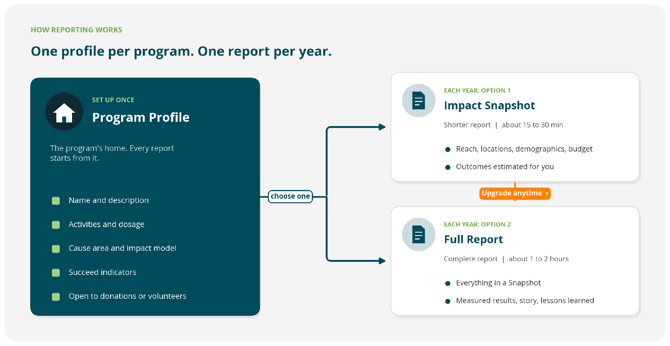
Every program you report on in True Impact has a Program Profile. The profile is the program's home: it holds the details that stay the same from year to year. Each year, you create one report from the profile, either an Impact Snapshot or a Full Report.
Program Profile
A Program Profile describes one of your programs: what it does, how often and how long people take part, the cause area it works in, its impact model, and the Succeed indicators it works toward. It also says whether the program is open to donations or volunteers. You complete it once when you set up your account and update it only if the program changes.
A Program Profile is not a report. It has no reporting year and no due date. Every program needs a complete profile before you can create a report for it.
Impact Snapshot
An Impact Snapshot is a shorter annual report. It answers two questions for the year: who did your program reach, and what did it cost? You enter your dates, locations, the number of people you reached, their demographics, and your program budget.
You do not enter outcome results in a Snapshot. Your Succeed indicators carry over from your Program Profile, but remain empty unless you upgrade to a Full Report.
Full Report
A Full Report is the complete annual report. It includes everything in a Snapshot, plus a full impact model: the optional Program Development, Learn, and Act stages, any additional Succeed indicators, the results you measured, and how you measured them. Final reports also include a success story and lessons learned. Most organizations finish a Full Report in 1 to 2 hours.
An example
Say your organization runs an after-school tutoring program.
- Program Profile (once, during account setup): You describe the program, note that students attend twice a week for the school year, choose Education as the cause area, choose an impact model, and choose "students improve their reading level" as a Succeed indicator.
- 2026 report, as an Impact Snapshot: You report that you enrolled 240 students across three schools, share their demographics, and enter a program budget of $180,000. True Impact estimates how many of those students improved their reading level, based on similar tutoring programs.
- Upgrading to a Full Report (optional): If a funder wants measured results, you upgrade the same 2026 report. Everything you entered stays. You add the reading assessments you ran, how many students improved, and a success story.
- 2027 report: You clone the 2026 report into 2027 and update the numbers.
Good to know
- Each program has one Program Profile and one report per year.
- You can upgrade a Snapshot to a Full Report. You cannot change a Full Report back to a Snapshot.
- When you update a Program Profile, the change applies to future reports. Reports you already created keep the details they had.