![true-impact-logo-color.svg]](https://support.trueimpact.com/hubfs/true-impact-logo-color.svg)
Creating a New Account
If your organization already has a True Impact account, request that they add you as a user to the existing account by following these steps.
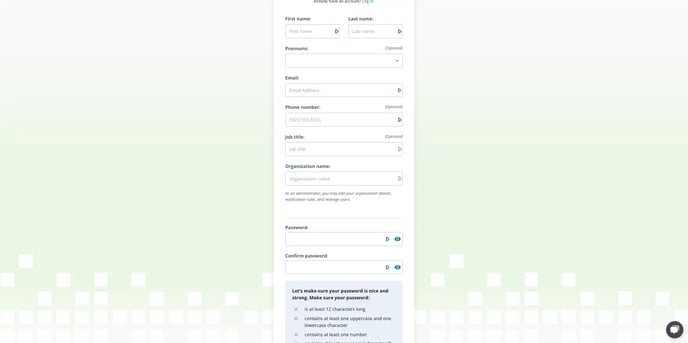
- On the main login page, click "Sign Up"
- Select your role (as a grantee, you will select "Nonprofit").
- Complete the required fields: First Name, Last Name, Email, and Organization Name.
- Create a password that meets the displayed requirements.
- Click "Sign Up"
- A confirmation email will be sent to your email inbox, confirm your email before proceeding
Accessing an Existing Account
- Open the login page.
- Enter your email address. Logging into True Impact is case sensitive, so if you have issues logging in, reach out to the True Impact team to ensure you're using the correct email.
- Enter your password.
- Click "Log In".
Resetting Your Password
While attempting to login to your True Impact account, if you see an error message, follow these steps to reset your password:
- Click the "forgot your password" link
- Enter your email address on the Reset Password page and click "send code"
- Check your email inbox for a message from True Impact with a link to reset your password. If you don't see the email, check your spam or junk folder
- Click the link in the email and enter your new password
Reporting in the Legacy Platform?
If you are updating a report that was originally created in our Legacy platform (prior to the release of the updated report builder in 2025) and need to resolve feedback or provide final updates on it, please login here.