![true-impact-logo-color.svg]](https://support.trueimpact.com/hubfs/true-impact-logo-color.svg)
This article walks you through the main tabs and settings in your True Impact Donor Account, including how to view your donations and reports, track feedback, explore your data dashboard, and manage your account settings.
Donations Tab
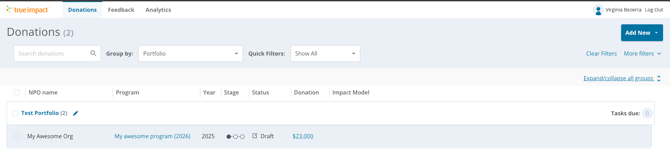
The Donations tab shows all of the portfolios associated with your account.
- Click on a portfolio name to view all of the investments and reports associated with it.
- Each report will show its status, donation amount, and the impact model used.
- This is what each of the status mean:
- Waiting: the grantee has not yet allocated the investment to a report
- Draft: the grantee has allocated the investment to a report
- Awaiting Feedback: the grantee has submitted their initial report for review
- Published: the report has been updated and is considered published, the grantee can still make edits to the report.
- Final Updates Needed: the end- date of the program is past due and the report is now ready for final updates
- Finalized: the report has been updated with final results and is locked, the grantee can no longer make edits to the report
- Click on a program name to open a report.
- To save a report, click the print icon in the top-right corner of the report and save it to your computer.
- For more information on how to add investments to your account, visit this link here.
Feedback Tab
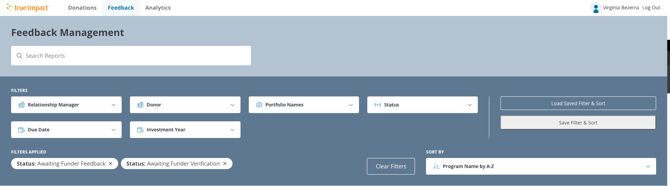
The Feedback tab shows all of the reports currently available for your review.
- This section is only populated with reports if your organization takes part in the feedback process with True Impact.
- Some donors do not review reports directly, in those cases, True Impact may be the only reviewer, and this tab will stay empty.
- For more information on providing feedback, visit this link here
Analytics Tab
The Analytics tab contains the aggregated data connected to your reports, shown as a dashboard tied to your account.
- Dashboard data refreshes automatically every hour from the database.
- For a complete overview of your data dashboard and how to navigate it, visit this article here.